

Introduction: Forgot Instagram Password Mobile
Forgetting your Instagram password can be stressful, especially when you rely on your mobile device to stay connected with friends, family, and work. In today’s digital world, Instagram has become a central platform for social interaction, sharing photos, videos, and stories, and maintaining a personal or business presence. Losing access to your account temporarily can disrupt your daily routine, create anxiety, and even impact business activities if you use Instagram professionally. Thankfully, Instagram provides a simple yet secure way to recover your account on mobile devices. This guide explores all the steps, tips, and solutions to regain access to your account efficiently.
Table of Contents
Understanding Why You Forgot Your Instagram Password
Forgetting a password is one of the most common issues in the digital era. Instagram accounts are protected by strong password requirements to ensure user security. These passwords often include a combination of uppercase and lowercase letters, numbers, and special characters. While this enhances security, it can also make remembering your password challenging. Several reasons may lead to a forgotten password:
- Infrequent Login: If you don’t log in regularly, you may forget your password over time. Mobile devices often keep you logged in automatically, which can create a false sense of memory retention.
- Multiple Accounts: Managing multiple social media accounts increases the chances of confusing passwords or mixing up login credentials.
- Password Changes: Sometimes, users change their password for security reasons but fail to remember the new password properly.
- Cybersecurity Threats: In rare cases, your password may be compromised, leading Instagram to automatically require a reset for security purposes.
Understanding why you forgot your Instagram password can help you avoid similar situations in the future and improve account recovery efficiency.
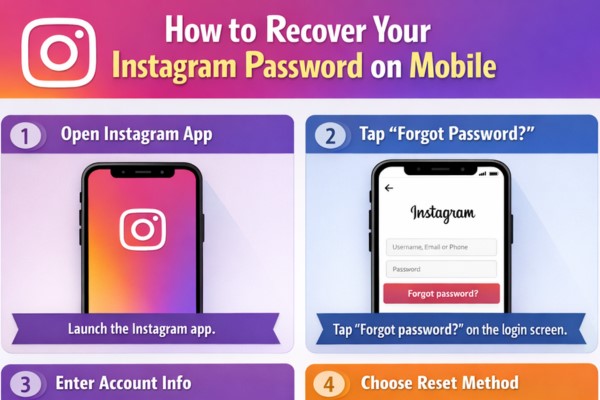
Step-by-Step Guide to Recover Your Instagram Password on Mobile
Recovering your Instagram password on mobile is designed to be simple, secure, and user-friendly. Here’s a detailed walkthrough for both iOS and Android devices:
Step 1: Open Instagram App
Start by opening the Instagram app on your mobile device. Make sure your app is updated to the latest version, as older versions may have bugs or outdated recovery options.
Step 2: Go to Login Page
On the login page, you will see a prompt asking for your username, email, or phone number. Below the password field, click “Forgot password?”. This is the official recovery route provided by Instagram.
Step 3: Enter Account Information
You will be prompted to enter one of the following:
- Your Instagram username
- The email address linked to your account
- The mobile number associated with your account
Entering accurate information is crucial, as Instagram will send recovery instructions based on the details provided.
Step 4: Choose Recovery Method
Instagram provides multiple ways to reset your password:
- Email Recovery: If you select email, Instagram will send a reset link to your registered email address. Click the link and follow instructions to create a new password.
- SMS Recovery: If you select mobile number, Instagram will send a verification code via SMS. Enter the code into the app to verify your identity and reset the password.
- Login with Facebook: If your Instagram account is linked to Facebook, you can choose to log in via Facebook. This bypasses the need for a password reset and allows instant access.
Step 5: Reset Your Password
Once your identity is verified, Instagram will prompt you to create a new password. Make sure to choose a strong, memorable password. Combining uppercase, lowercase, numbers, and symbols improves security. Avoid using common phrases or easily guessable patterns.
Step 6: Log in with New Password
After successfully resetting your password, log in to your account using your new credentials. You may be required to log in on all devices where you previously used Instagram.
Troubleshooting Issues During Password Recovery
Sometimes, users encounter problems even after following the recovery steps. Common issues include:
Email Not Received
If you do not receive the password reset email:
- Check your spam or junk folder.
- Ensure the email address entered is the same as registered with Instagram.
- Wait a few minutes, as email servers may experience delays.
SMS Verification Not Received
If the SMS verification code doesn’t arrive:
- Confirm your mobile number is correct and active.
- Check your mobile network connection.
- Avoid using third-party SMS apps that may block messages.
Account Not Found
If Instagram reports that your account cannot be found:
- Ensure you entered the correct username, email, or phone number.
- Check for typos or spacing errors.
- Consider whether your account may have been deactivated or banned.
Tips to Remember Your Instagram Password on Mobile
Once you regain access, it is crucial to prevent future password issues. Here are some effective tips:
- Use a Password Manager: Tools like LastPass or 1Password securely store passwords and can autofill credentials on mobile apps.
- Write Down Securely: If you prefer, write your password in a secure place or encrypted note app.
- Enable Two-Factor Authentication (2FA): Instagram allows you to enable 2FA using SMS or authentication apps, enhancing account security and recovery options.
- Use a Memorable Yet Strong Password: Combine personal phrases with numbers and symbols that are easy for you to remember but difficult for others to guess.
Security Measures During Mobile Password Recovery
When recovering your Instagram password on mobile, security should be your top priority. Avoid public Wi-Fi networks while entering sensitive information. Be cautious of phishing attempts that mimic Instagram’s official interface. Always ensure you are using the official Instagram app or website. Instagram also occasionally prompts users to verify suspicious logins, adding an extra layer of security.
Avoid Third-Party Recovery Apps
Many apps claim to recover Instagram passwords without following official procedures. These apps are often malicious and can compromise your account. Stick to Instagram’s official recovery process to maintain security.
Keep Email and Phone Number Updated
Regularly updating your email and phone number associated with Instagram ensures recovery messages reach you. This is particularly important if you change carriers or email addresses.
Advanced Recovery Options
In rare cases, users may lose access to both email and phone number linked to Instagram. Instagram provides options to recover accounts in such situations:
- Identity Verification: Instagram may ask you to upload a photo holding a government-issued ID to verify ownership.
- Support Requests: Contact Instagram support through the app to explain your situation. They may provide additional recovery options.
These advanced steps ensure that even if your primary recovery channels fail, you still have a chance to regain access.
Frequently Asked Questions (FAQs) About Forgot Instagram Password Mobile
Can I recover Instagram password without email or phone number?
Yes, but you will need to verify your identity through Instagram’s support, which may include submitting an official ID.
How long does it take to reset my password on mobile?
Typically, the email or SMS recovery code arrives within a few minutes. In rare cases, it may take up to an hour due to server delays.
Is it safe to reset Instagram password on mobile?
Yes, as long as you use the official Instagram app or website and avoid third-party apps, it is completely safe.
What if my account was hacked?
If you suspect hacking, reset your password immediately and enable two-factor authentication. Report suspicious activity to Instagram through the security settings.
Conclusion
Forgetting your Instagram password on mobile is a common but solvable problem. With Instagram’s robust recovery methods—including email, SMS, and Facebook login—regaining access is straightforward. Following best practices like using strong passwords, enabling two-factor authentication, and keeping recovery details updated will minimize future login issues. By carefully following the steps outlined in this guide, you can restore access to your Instagram account securely and efficiently, ensuring your online presence remains uninterrupted.